You've seen the listings — "certified refurbished," "Grade A," "like new." But what do those words actually mean? What happened to that phone between someone's hands and the shelf? Most buyers have never seen the inside of a refurbishment facility. This guide takes you through the entire process, step by step, exactly as it happens in a professional US refurb operation — from the moment a device arrives at the warehouse door to the moment it ships to you.

Why this matters for buyers

Understanding how refurbishment works helps you read listings more critically, ask better questions, and immediately spot the difference between a vendor doing it properly and one cutting corners. A vendor who skips data erasure or battery replacement isn't just being cheap — they're passing the cost of their shortcut onto you.
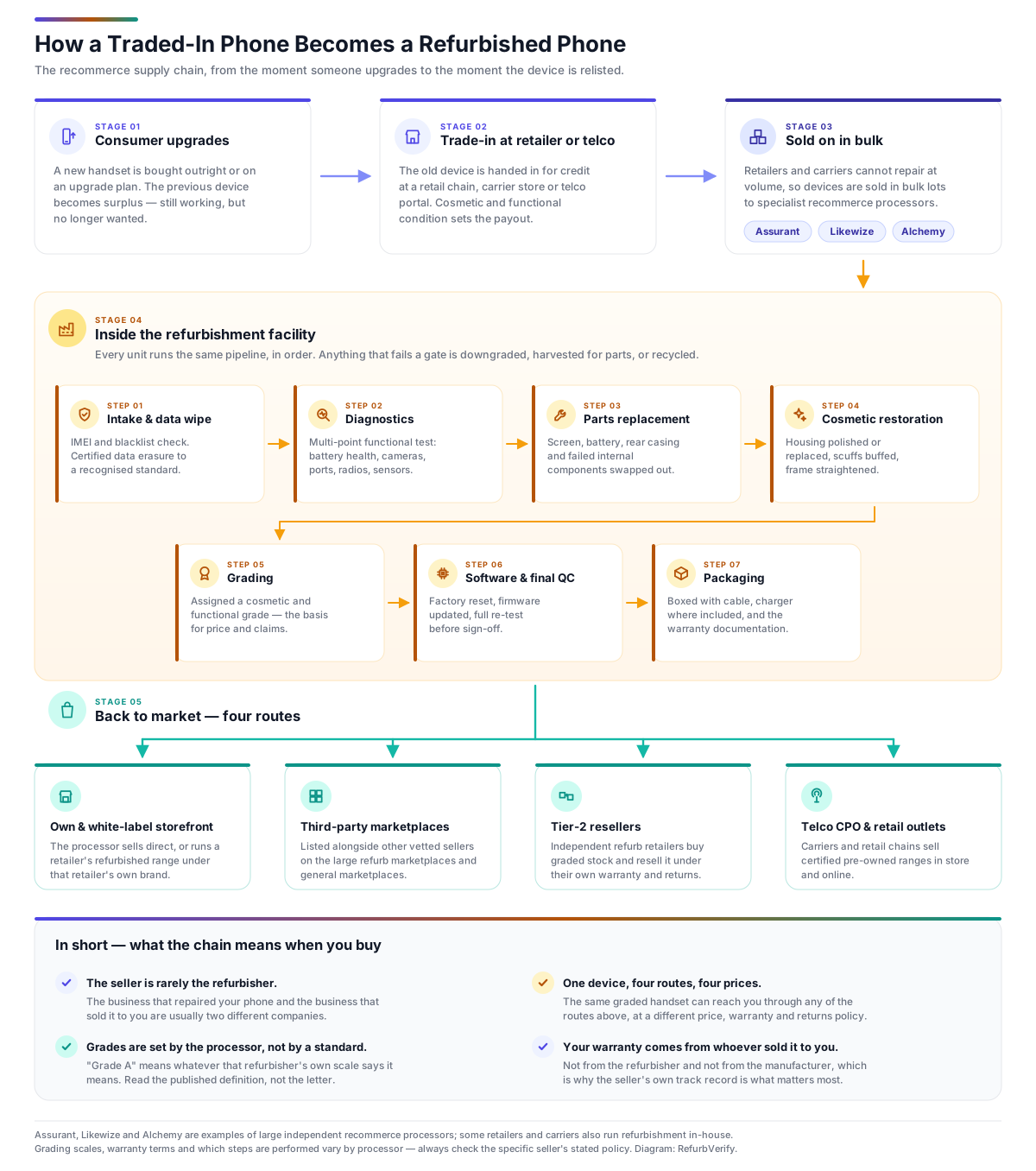
1. Where Devices Come From — The Supply Chain

Before any refurbishment happens, a vendor needs a supply of used devices. This is the part consumers rarely think about, but it shapes everything downstream. Reputable US vendors source from several channels:

📱
Source 1
Consumer trade-ins
Customers trading in their old device for a discount on a new one. This is the most direct route — Back Market, Swappa, Decluttr, and Gazelle all run trade-in programs. The vendor knows the device history is one private user and it usually arrives with original accessories.
🏢
Source 2
Corporate and enterprise lease returns
When a company refreshes its fleet of laptops, phones, or tablets every 2–3 years, the old devices are returned to an IT Asset Disposition (ITAD) vendor. Enterprise devices are often in excellent condition — well-maintained, lightly used, frequently updated. They arrive in large, uniform batches which is why enterprise-sourced refurbs tend to be very consistent.
📦
Source 3
Carrier and manufacturer returns
Phones returned within the 14-day window at carriers like AT&T, Verizon, or T-Mobile, or returned to Apple or Samsung directly. These devices may have been used for just a few days. Manufacturers often refurbish these themselves (Apple Certified Refurbished) or sell them in bulk to third-party vendors. This is the highest-quality supply pool.
🛒
Source 4
Wholesale lots and auction
Budget and mid-tier vendors buy mixed-condition devices in bulk at auction — often thousands of units at a time. The condition is unpredictable: some units may be in near-new shape, others heavily worn or needing significant repair. This is why mixed-lot sourcing produces more variable results and why grading becomes even more important.
🏪
Source 5
Peer-to-peer marketplace surplus
Some vendors buy from eBay, Craigslist, or Facebook Marketplace — picking up individual devices that pass a quick screen. This is common with smaller specialist resellers. It's more labor-intensive per unit but can surface unusual models or configurations that bulk channels miss.
What buyers should know about sourcing

A vendor that sources primarily from carrier returns and corporate leases will produce a more consistent product than one relying on mixed wholesale lots. When a vendor says "we source from leading US carriers and Fortune 500 fleet refreshes," that's a meaningful quality signal — not just marketing language.

2. Intake and Initial Triage

Devices arrive at the warehouse — sometimes as single units in bubble wrap, sometimes as pallets of thousands. The first step is intake: logging each device into the system, recording its IMEI or serial number, verifying it against the purchase order, and running a rapid visual inspection.

At intake, a technician spends 60–90 seconds doing a first-pass sort:

High-volume operations may run automated conveyor intake systems where devices pass under cameras that log serial numbers and photograph all six sides for a baseline condition record. This photography at intake is important — it protects the vendor against fraudulent "damage on arrival" return claims.

3. Data Erasure and Device Unlock

This is arguably the most important step for both safety and legality. Every device must be fully wiped before it can be sold. A vendor selling a phone with someone else's data on it — even accidentally — faces serious legal exposure under US state privacy laws.

What a proper data wipe looks like

Red flag: "May still have Activation Lock" or "Sold as-is, no unlock"

Walk away. A locked device is essentially a paperweight for a new owner. Reputable vendors guarantee unlock status before listing and will honor this with a full refund if wrong.

4. Automated Diagnostic Testing

After wiping, each device goes through a comprehensive diagnostic suite. Better vendors use automated testing rigs — purpose-built hardware stations or software platforms — that run 40 to 70+ individual tests in under 10 minutes. What's being tested:

Display tests

Battery tests

Camera tests

Audio and connectivity

Sensors and biometrics

Physical components

The diagnostic report is logged against the device's serial number. Any failed tests automatically route the device to the relevant repair station. A device that passes all tests with a battery above 80% and no screen defects is on a fast-track to cosmetic assessment. A device with a failing camera or borderline battery goes to the repair bench.

5. Repair and Parts Replacement

This is where the real labor cost lives. Repairs are triaged by economics: a $15 battery replacement on a $350 phone makes sense; a $200 screen replacement on a $180 phone doesn't. Vendors make deliberate decisions here:

Battery replacement

The most common repair by far. Most quality vendors replace batteries below 80% health as a matter of policy — it's cheap relative to the sale price improvement it enables. Apple Certified Refurbished replaces all batteries regardless of health. Budget vendors may retain original batteries and simply disclose the health. Always ask.

Screen replacement

Cracked or dead-pixel screens are replaced. This is more nuanced on iPhones — Apple's parts pairing system means a non-genuine Apple screen may trigger a "non-genuine part" warning in Settings. Reputable vendors use OEM or Apple-sourced screens; budget vendors may use aftermarket parts that look fine visually but won't match the original color calibration or touch response.

Housing and back panel

For phones with glass backs (most modern flagships), a heavily cracked back is replaced. Aluminum-frame phones with dents may have the frame straightened or replaced. Some vendors source OEM replacement housings direct from manufacturers; others use high-quality third-party equivalents.

Button and port repairs

Sticky buttons, intermittent power buttons, and broken lightning ports are common. Technicians replace the relevant component assembly. Charging port replacement is a particularly high-value repair — a phone that won't charge reliably is nearly unusable, but a $20 port replacement makes it fully functional again.

Logic board issues

More serious faults — short circuits, water damage corrosion, failed chips — require logic board-level repair. Only specialist vendors attempt this. Most operations will downgrade a device with board-level issues to parts-only rather than attempt an expensive repair that may not hold.

OEM vs aftermarket parts — what to look for

OEM (original manufacturer) parts are always preferable — they maintain the device's original performance characteristics. Reputable vendors specify "genuine Apple parts" or "manufacturer-sourced components." If a listing doesn't mention parts quality, ask. For iPhones especially, this matters because iOS reports non-genuine screens and batteries in Settings.

6. Cosmetic Restoration and Polishing

Once a device is fully functional, attention turns to how it looks. The goal of cosmetic restoration is to make the device look as close to its graded condition as possible — and the grading is being determined simultaneously by what the cosmetic team can and can't fix.

Machine polishing

Fine scratches on aluminum, stainless steel, or titanium frames can be buffed out with automated polishing machines — similar to what jewelers use. The device is fitted into a jig, a polishing compound is applied, and the machine cycles through progressively finer grits. A well-polished aluminum frame goes from visibly scuffed to mirror-bright. Glass backs cannot be polished (the oleophobic coating would be removed), so scratched glass panels are replaced rather than buffed.

Deep cleaning

Grease, dust, skin oils, and debris are removed from every surface:

Housing swaps

For heavily worn devices, it's sometimes more economical to transfer the logic board and components into a fresh housing shell than to repair the original. This is more common with iPhones 11 and earlier (which have modular designs making housing swaps practical) and less common with newer models where adhesive-sealed construction makes it labor-intensive.

Screen protectors and aesthetic wraps

Most vendors apply a fresh screen protector before packaging — both as a selling feature and to protect the device during shipping. Some apply minimal vinyl wraps to hide minor cosmetic imperfections on housings, though transparent vendors will disclose this.

7. Software Reload and Final Configuration

With the hardware in order, the device receives a fresh software install:

8. Grading and Quality Control Sign-Off

Now the device gets its official grade. A QC technician reviews the full diagnostic report, examines the physical device under controlled lighting, and assigns the final grade that will appear on the listing.

Grade Cosmetic standard Battery health Functional standard
Grade A / Like New No visible scratches under normal viewing. May have micro-marks only visible at certain angles under direct light. 85–100% (often replaced to 100%) All functions pass. No faults.
Grade B / Good Light scratches visible under close inspection. No cracks, dents, or heavy wear. 80–90% All functions pass. No faults.
Grade C / Fair Visible scratches or light scuffs from normal use. Possibly minor dents or marks on housing. 75–85% All functions pass. No faults.
Grade D / Poor Heavy wear, significant scuffs, dents, or visible marks. Fully functional but showing its age cosmetically. 70%+ All functions pass. Cosmetics only.

The grading inspection is done under a daylight-spectrum LED lamp — the harshest possible lighting that reveals every micro-scratch. What passes under this light looks great under real-world lighting conditions.

QC sign-off is the final human checkpoint before a device moves to photography. Any device the QC technician isn't satisfied with is sent back for further cosmetic work or re-graded. A failed QC that gets pushed through is how vendor return rates climb — and how bad reviews accumulate on Trustpilot.

A note on grade consistency

Grading standards are not universal across the industry. "Grade A" at one vendor may be "Grade B" at another. This is a real problem — and one reason RefurbVerify tracks customer-reported satisfaction alongside advertised grades. Always read the vendor's own grade definitions before ordering, not just the grade label.

9. Photography, Listing, and Pricing

Every refurbished device needs a product listing, and how a vendor creates that listing tells you a lot about how seriously they take transparency.

Photography

Better vendors photograph each individual unit — you see the actual device you'll receive. Budget vendors use stock photography of a pristine device, which tells you nothing about the cosmetic condition of your specific unit. The gold standard is individual unit photos from all angles under the same daylight lamp used for QC.

Listing content

A transparent, well-written listing will always include:

Pricing

Pricing algorithms are sophisticated at larger vendors. A device is priced based on: current new retail price, competing refurb listings, grade, storage size, color demand, age of model, and current inventory levels. Prices float dynamically — a phone can drop 10–15% in a week if new stock comes in or a competitor drops their price. This is why it often pays to watch a listing for a few days before buying.

10. Packaging and Dispatch

Packaging is the last thing that happens before the device leaves the vendor's hands — and it matters more than buyers tend to think. Poor packaging means damage in transit; damage in transit means returns and unhappy reviews.

What goes in the box

Protective packaging

The device is wrapped in an anti-static bag, then secured in foam or a form-fitting mold inside the box. The outer carton is sealed and labeled. High-volume vendors use automated box-sealing lines; smaller operations do this by hand. The goal is that the device survives a 4-foot drop test — the kind of handling packages routinely receive in logistics networks.

11. Warranty, Returns, and After-Sale Service

What happens after the sale is the real test of a refurb vendor's quality promise. Any vendor can sell a working device. The question is what they do when something goes wrong six months later.

Warranty processing

A legitimate warranty claim (device stopped working within the warranty period, not caused by physical damage or liquid) triggers:

  1. Customer contacts vendor — typically via online portal, email, or phone
  2. Vendor issues a prepaid return label
  3. Device arrives back at the warehouse and goes through the same diagnostic suite used before sale
  4. If the fault is confirmed, the device is repaired and returned, or a replacement unit of the same grade is shipped
  5. If no fault is found ("no fault found" or NFF), many vendors still ship the device back — though some charge a return processing fee, which is worth checking before buying

Returns

Vendors with good return policies (30 days, no-questions-asked) can afford to be confident in their grading — because they know their QC catches problems before they ship. Vendors with restrictive return policies (7 days, buyer pays return shipping, restocking fees) are either operating on thin margins or not confident in their own process. The return policy is one of the most telling signals about a vendor's self-confidence in their refurbishment standards.

Refurb of returned units

Returned devices that are still functional go back through the process from Step 4 — re-diagnosed, re-inspected, re-graded (sometimes downgraded), re-listed. Nothing goes back on sale without passing through QC again. Devices with no-fault-found returns are typically relisted as-is at the same grade. Devices returned with genuine faults that are repaired go back into normal inventory.

How the Process Differs by Vendor Type

Not all refurbishers are equal. The process above describes a quality US operation. Here's how it varies across the vendor spectrum:

Vendor type Typical process quality US examples
Manufacturer Certified Gold standard. Full factory process, OEM parts, 100% battery replacement, 1-year warranty, tested to new-device spec. Apple Certified Refurbished, Dell Outlet, Lenovo Outlet
Premium Marketplace Rigorous 3rd-party or in-house grading, strong QC, 12-month warranties, 30-day returns, own repair technicians. Back Market (Grade Premium), Swappa
Specialist Reseller Deep expertise in specific category (cameras, audio, Apple), high-touch QC, often slower throughput but excellent consistency. KEH Camera, Adorama Used, OWC/macsales.com, Sweetwater Gear Exchange
Volume Marketplace Variable — marketplace lists third-party sellers with different standards. Check individual seller ratings, not just the platform. Amazon Renewed (varies by seller), eBay Refurbished
Budget Reseller Thinner margins mean less labor per unit. May skip battery replacement, use aftermarket parts, shorter warranties, basic QC. Various — check Trustpilot before ordering
Bottom line for buyers

A quality refurb vendor is running what amounts to a small electronics factory — intake, data erasure, 50+ diagnostic tests, targeted repairs, cosmetic restoration, software reload, QC sign-off, photography, packaging, and post-sale support. That process takes real time and real skill. When you see a refurbished iPhone listed for $40 less than every other vendor, ask yourself which of those steps they skipped to get there.

The best refurbished devices aren't just "used phones that were cleaned." They're phones that passed a more rigorous inspection than most new phones receive — where a real technician held the device, looked it over under harsh light, ran it through a battery of tests, and signed off on it. That process, done right, is why a well-sourced refurb from a quality vendor can be a smarter buy than new.


Compare US vendors by TrustScore

Now that you know how the process works, use RefurbVerify's independent leaderboard to see which vendors have the track record to back up their process.

See All Vendors → Monthly Best Buys →

Related Guides